Simplifying NSJSONSerialization in Swift

While writing a pet project app in Swift I put together this convenience function that simplifies converting an NSData into JSON objects via the NSJSONSerialization class. My JSONObjectWithData function adds a Swift-friendly API on top of the Foundation method of the same name. Here is a Gist showing how it works and how to use it.


import Foundation
/** Outputs of the JSONObjectWithData function. */
enum JSONObjectWithDataResult
{
case Success(AnyObject)
case Failure(NSError)
}
/**
Attempts to convert the specified NSData to JSON objects
and returns either the root JSON object or an error.
*/
func JSONObjectWithData(
data: NSData,
options: NSJSONReadingOptions = nil)
-> JSONObjectWithDataResult
{
var error: NSError?
let json: AnyObject? =
NSJSONSerialization.JSONObjectWithData(
data,
options: options,
error: &error)
return json != nil
? .Success(json!)
: .Failure(error ?? NSError())
}
//
// Example usage
//
func readSomeJSON()
{
// Get JSON data somewhere…
let data = NSData()
switch JSONObjectWithData(data)
{
case .Success(let json): println("json: \(json)")
case .Failure(let error): println("error: \(error)")
}
}

view raw

main.swift

hosted with ❤ by GitHub

Posted in Swift | Tagged , | 2 Comments

Nil-coalescing Operator in Swift

Update: As of Xcode 6 Beta 5 this article is obsolete. Swift now includes a nil coalescing operator (??). I am leaving this article on my blog for people who are curious about why such an operator exists or when to use it.

Working with optionals in Swift can lead to a lot of uninteresting code that unwraps a value and, if it is nil, uses a suitable default value. The problem is compounded by the fact that Swift requires if/else bodies to be enclosed with { braces }. This can cause what should be a simple, small piece of code to become tedious and verbose.

Consider a simple scenario where the user can type a number into a UITextField, which is then parsed from a String to an Int and stored in a data object. String.toInt() returns an Optional<Int> because not all strings can be parsed to an integer value. Regardless of this minor complication, there is no reason why performing such a task should require more than one line of code.

As seen in the last example above, I created a custom operator function, dubbed the nil-coalescing operator. That operator function evaluates to an optional’s value unless it is nil, in which case it evaluates to a fallback/default value. This is based on the null-coalescing operator in C#, which is formed by two adjacent question marks (??). Since Swift does not allow custom operator functions to include a question mark (correction: it does as of Xcode 6 Beta 5), I instead opted for two adjacent exclamation marks (!!). I think of it as “If the optional cannot be unwrapped (because it’s nil), then use this value instead.”

It’s important to note that the expression on the right-hand side of the operator does not execute unless the left-hand expression evaluates to nil. I accomplished that intuitive and expected behavior by making use of “auto-closures”; a relatively obscure Swift feature that allows you to create closures without using { braces }.

Here is a GitHub gist that shows the nil-coalescing operator definition and a few use cases.


//
// UPDATE: This gist was rendered obsolete as of
// Xcode 6 Beta 5, which introduced the nil
// coalescing operator in Swift proper (??).
//
/* Nil-coalescing operator */
infix operator !! {}
func !! <T> (
value: T?,
defaultValue: @auto_closure () -> T)
-> T
{
return value ? value! : defaultValue()
}
let text = "13"
let number = text.toInt() !! 0
println(number)
// prints: 13
println("word".toInt() !! 99 + 1)
// prints: 100
// Prints a message to show when it executes.
func getDefaultNumber() -> Int
{
print("Getting the default number…")
return -1
}
println("42".toInt() !! getDefaultNumber())
// prints: 42
println("Josh".toInt() !! getDefaultNumber())
// prints: Getting the default number…-1

view raw

main.swift

hosted with ❤ by GitHub

Notice that the second to last example does not cause the getDefaultNumber() function to execute, but the last example does because it’s optional value is nil.


I’d like to thank my friend Jordan Nolan for bringing this point up and nudging me to work out a solution.
Posted in Swift | Tagged , | 21 Comments

Custom Threading Operator in Swift

The Swift language supports custom operator functions, similar to operator overloading in C++. This kind of language feature has been known to enable overly “enthusiastic” developers to create a quagmire of unreadable code, which is why I was surprised to see it included in Swift. However, when used with careful consideration and restraint, defining new operators can yield elegant and expressive code with minimal cognitive friction for its readers. In this article I show how to define an operator that simplifies thread marshaling, in particular the transfer of execution from a background thread to the main thread of an iOS app.

The code reviewed in this article is available on Github.
https://github.com/ijoshsmith/swift-threading

This code was compiled and tested against Xcode 6 Beta 5.

Demonstration

The sample project on Github uses a custom operator function in the ViewController.swift file. After the user taps a button two anonymous functions execute on a background thread. When a function completes on the background thread an associated function (i.e. closure) executes on the main thread.

When this code executes it logs:

[back] hello
[back] adding...
[main] goodbye
[main] sum = 49995000

Note that the handleButton action method appears to join closures with a mysterious new ~> operator…

{ /* background code */ } ~> { /* main thread code */ };

Operator ~>

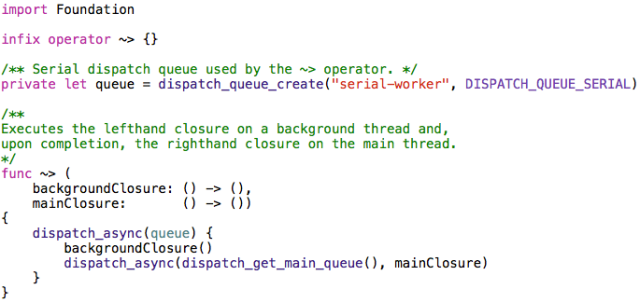
The Tilde-GreaterThan operator (hereafter known as the marshal operator) is not part of Swift proper. I invented it to express thread marshaling semantics. It executes the lefthand closure on a background thread and when that completes it executes the righthand closure on the main thread. This is a very common thing to do when writing iOS apps that don’t suck, but with Objective-C there was never a terse, streamlined way to express it. Swift to the rescue!

I wrote two versions of the marshal operator. Let’s examine the simple version first.

Since Swift does not contain a ~> operator it is necessary to declare its existence, which is the first line of code seen after importing Foundation. The operator function is declared as infix because the ~> appears between two closures. This makes sense if you think of the tilde (~) as representing a thread doing its work and then “pointing at” (>) the next closure to execute when it completes.

The next line of code is an implementation detail. That queue constant is bound to a serial GCD dispatch queue on which all background closures execute. I chose to make it serial instead of concurrent because that simplifies the programming model, but feel free to make the queue concurrent if you prefer it that way.

The operator implementation is basic Grand Central Dispatch API usage, simply executing the background closure on a queue and, when it completes, marshaling back to the main thread’s queue to invoke a completion handler.

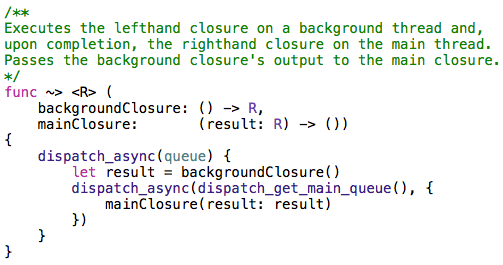
As seen previously, there is another version of the marshal operator that allows the background closure to return a result, which is passed to the main thread closure as a parameter. That operator function definition is very similar to the one seen above.

Other ideas

This code is just a starting point. There are many similarly useful versions of the marshal operator just waiting to be written. For example, you might have an array of closures on the lefthand side that all must complete before the main thread closure executes, which could make use of a dispatch group to manage completion handling. Or perhaps an operator that chains together multiple background closures and ends with a main thread closure. The possibilities are endless. Just make sure you don’t go overboard with it!


Posted in Swift | Tagged , , | 16 Comments

Understanding Swift’s reduce Method

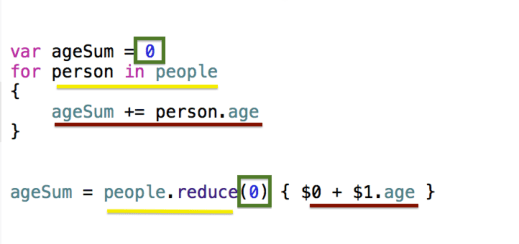
Swift’s API includes many functions and instance methods that reflect its functional programming heritage. A prime example is called reduce.  You can reduce a collection of values down to just one value, such as calculating the sum of every person’s age in an array of Person objects. Using reduce eliminates the need for writing many loops in a program. Here is an annotated code listing that shows a loop and the equivalent usage of reduce to add together the age of every person in an array.

There are three matching parts between the two code snippets. The green box in both snippets shows how an initial value is defined, in this case zero. The yellow underline shows how each approach iterates the array of Person objects. The red underline is where the sum is accumulated. In the reduce code, the first closure argument ($0) is the running total, which starts at zero, and the second parameter ($1) references a Person object in the people array.

Posted in Swift | Tagged , | 7 Comments

Create a Swift Dictionary from an Array

Here is a Gist I posted showing a Swift utility function that enables you to create a Dictionary containing an optional entry for every element in an Array. It uses the reduce function to create one Dictionary from every element in an Array, based on a closure you provide that turns an array element into a key-value tuple.

This code was compiled and tested against Xcode 6 Beta 3.


/**
Creates a dictionary with an optional
entry for every element in an array.
*/
func toDictionary<E, K, V>(
array: [E],
transformer: (element: E) -> (key: K, value: V)?)
-> Dictionary<K, V>
{
return array.reduce([:]) {
(var dict, e) in
if let (key, value) = transformer(element: e)
{
dict[key] = value
}
return dict
}
}
struct Person
{
let name: String
let age: Int
}
let people = [
Person(name: "Billy", age: 42),
Person(name: "David", age: 24),
Person(name: "Maria", age: 99)]
let dictionary = toDictionary(people) { ($0.name, $0.age) }
println(dictionary)
// Prints: [Billy: 42, David: 24, Maria: 99]

Posted in Swift | Tagged , , | 2 Comments

Cross-join two Swift arrays

Here is a Gist I just published on GitHub of a utility function that performs a cross-join between two Swift arrays. This allows you to iterate over one array for every element in another array, and return an optional value built for each pair of array elements.

This code was compiled and tested against Xcode 6 Beta 3.


extension Array
{
func crossJoin<E, R>(
array: [E],
joiner: (t: T, e: E) -> R?)
-> [R]
{
return arrayCrossJoin(self, array, joiner)
}
}
/**
Executes the `joiner` closure for every combination
of elements between `aArray` and `bArray` and returns
the resulting objects in the order they were created.
*/
func arrayCrossJoin<A, B, R>(
aArray: [A],
bArray: [B],
joiner: (a: A, b: B) -> R?)
-> [R]
{
var results = [R]()
for a in aArray
{
for b in bArray
{
if let result = joiner(a: a, b: b)
{
results.append(result)
}
}
}
return results
}
let letters = ["A", "B", "C"]
let numbers = [1, 2]
let dictionaries = letters.crossJoin(numbers) { [$0: $1] }
println(dictionaries)
// Prints: [[A: 1], [A: 2], [B: 1], [B: 2], [C: 1], [C: 2]]

view raw

CrossJoin.swift

hosted with ❤ by GitHub

Posted in Swift | Tagged , , | 1 Comment

Randomly shuffle a Swift array

I just posted a Gist on GitHub that shows how to add a shuffle method to Swift’s Array class, which randomizes the order of an array’s elements. My shuffle method relies on the arc4random function, which means that the file containing that extension method must import the Foundation module. It’s not too efficient, considering it loops over the input array several times, but for a small array it is fast enough.

This code was compiled and tested against Xcode 6 Beta 3.


import Foundation
extension Array
{
/** Randomizes the order of an array's elements. */
mutating func shuffle()
{
for _ in 0..<10
{
sort { (_,_) in arc4random() < arc4random() }
}
}
}
var organisms = [
"ant", "bacteria", "cougar",
"dog", "elephant", "firefly",
"goat", "hedgehog", "iguana"]
println("Original: \(organisms)")
organisms.shuffle()
println("Shuffled: \(organisms)")

Posted in Swift | Tagged , , | 3 Comments

Swift Case Study: Histograms

This article examines a program written in Swift that creates text-based histogram renderings. The purpose of this case study is to show how such a program can leverage features found in the initial pre-release version of Swift.

The Xcode 6 project reviewed here can be found on Github:
https://github.com/ijoshsmith/Swiftogram

In-depth information about Swift is available from Apple:
https://developer.apple.com/swift/

For general information about histograms, refer to this page on Wikipedia:
http://en.wikipedia.org/wiki/Histogram

Note: All class members prefixed with an underscore in this codebase are considered private. At the time of this writing, Swift does not yet support access modifiers like private and protected.

This code was compiled and tested against Xcode 6 Beta 5.

Overview

The program, named Swiftogram, is an OS X command line tool. It includes a data set with records that represent parents, including how many children they have and in which US state they live. Swiftogram creates two textual histograms based on records in the data set. All labels and values in the histograms are calculated and arranged dynamically, as if the data set could contain different records every time it is accessed. Here is a screenshot of both histograms.
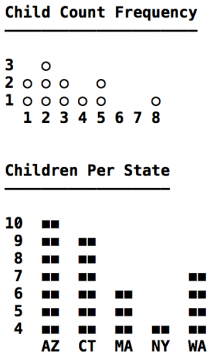
Child Count Frequency histogram
Description: Depicts how many parents have the same number of children.
X Axis: Represents how many children a parent has. It ranges from the smallest to the largest number of children per parent.
Y Axis: Represents the number of occurrences of a child count on the X axis. It ranges from the lowest to highest number of occurrences of a per-parent child count.

Children Per State histogram
Description: Depicts how many children live in the same US state.
X Axis: Represents a set of US states.
Y Axis: Represents the number of children living in a US state. It ranges from the lowest to highest number of children per state.

Points of interest

  • The X axis can contain either a continuous range of integers or a discrete set of strings.
  • A numeric axis can include numbers for which there are no corresponding data values, such as 6 and 7 on the X axis of the Child Count Frequency histogram.
  • A histogram’s column and inter-column gap widths vary based on the width of the X axis labels.
  • Y axis label text is right-aligned.
  • The character used to draw columns is configurable.

API Usage

The main.swift file uses classes reviewed in the rest of this article.
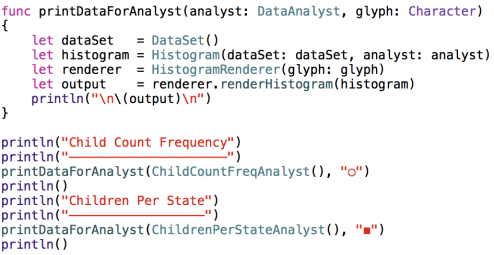
As seen above, each histogram’s data is provided by a DataAnalyst object. Let’s now turn our attention to that portion of the codebase.

Data Analysis

The DataSet class contains hard-coded dictionaries with information about parents and their children.
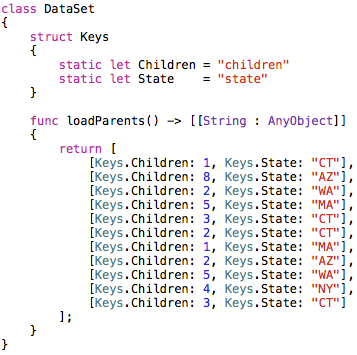
In a real-world program this data would be retrieved from a server or perhaps pulled out of a local SQLite database. The point is that the data analysis code must treat this data generically, and not assume it knows what data exists. Here is all of the data analysis code in the program:
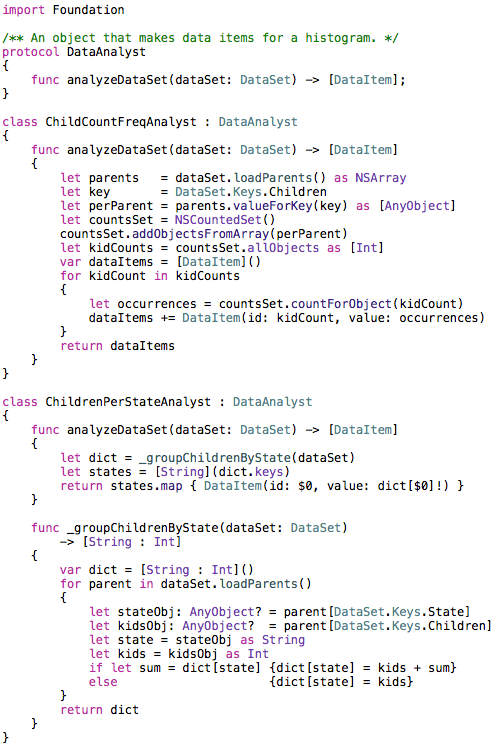
The ChildCountFreqAnalyst class uses NSArray’s support for the valueForKey: method, which is part of the Key-Value Coding (KVC) API, in the Foundation framework. It also uses NSCountedSet to tally up how many occurrences of each number of children per parent are found. This shows how Swift can easily make use of Foundation classes without needing to introduce Objective-C interop to the project.

The last line of ChildrenPerStateAnalyst’s analyzeDataSet method uses the trailing closure syntax when calling the map method. There is no need to use function call parentheses if a method’s one and only parameter is a closure. The closure used by the map method makes use of the shorthand argument name $0 for the closure’s first parameter, which in this case refers to a String that contains a US state abbreviation. The map method returns an array containing a DataItem object for every US state in the data set.

The DataItem class is shown below:
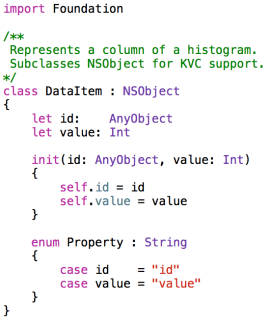
The nested Property enum will be seen again in the next section, when constructing a histogram’s axes.

Modeling a Histogram

A histogram consists of an X axis, a Y axis, and a set of columns.
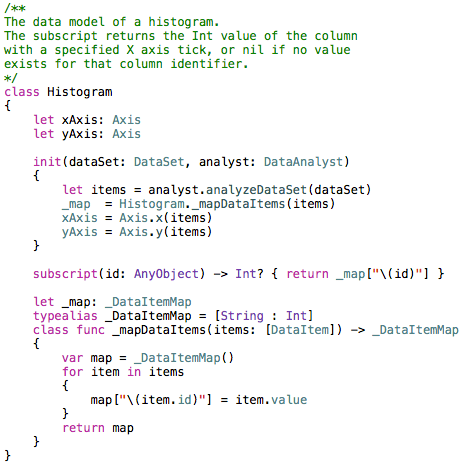
An axis has an ordered list of ticks, each of which is associated with an integer or string value. Each column is uniquely identified by a tick on the X axis and has an integer value that represents the Y axis tick to which it extends.

Every column must have an associated X axis tick, but not every numeric X axis tick must have an associated column. This can be seen in the Child Count Frequency histogram (shown above) which does not have a column for the 6 and 7 ticks on the X axis, because no parent in the data set has six or seven children.

Here is the code that represents an axis.
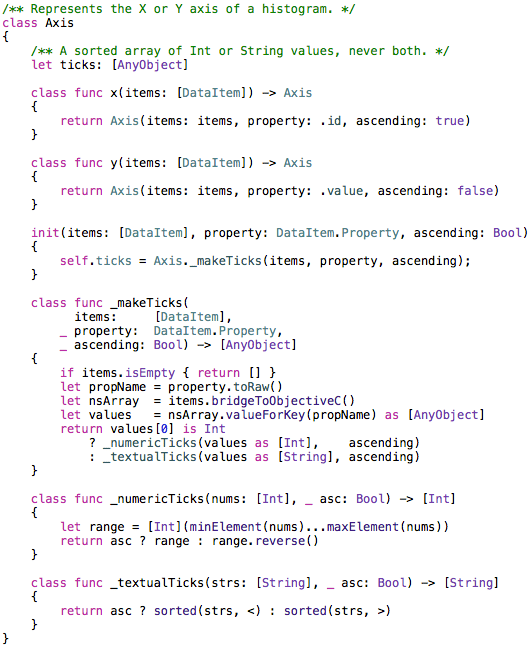
The _makeTicks method uses KVC to grab a property value from every DataItem in the items array. This makes use of the DataItem.Property enum seen earlier. The toRaw method is called to get the underlying String of the enum value, which in this case is the name of a DataItem property (id or value).

Notice in the _numericTicks method that an Int array is created ranging from the lowest to the highest value in the nums array. If the numeric ticks must be in descending order, the array’s reverse method is used.

In the _textualTicks method it is necessary to perform a sort no matter which sort order is needed, since there is no guarantee that the incoming String array is already sorted. The terse sorting code in that method is made possible thanks to Swift’s support for operator functions, such as the < and > operators that compare two String objects.

Rendering a Histogram

Now that we have a histogram data model populated with data items created by a data analyst, let’s turn our attention to creating a visual depiction of a histogram. The Swiftogram application renders histograms in an ASCII art style, meaning it creates a multi-line string that crudely approximates a histogram. The data model is generic enough that it could easily be reused to create a graphical rendering, perhaps with Core Graphics, if that tickles your fancy.

The following screenshot is a reminder of what the histograms look like. Note that the underlined headers are not part of the histogram rendering, those are printed separately in the main.swift file.
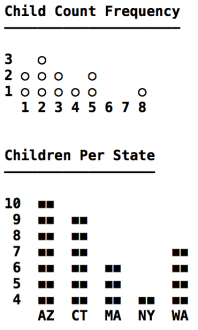
An axis is rendered as a set of labels, either numbers or strings. The labels on an axis must all be the same width (i.e., same number of characters). As seen on the Y axis of the second histogram, the text in a label is right-aligned. This ensures that all numbers on the Y axis less than ten are rendered in the ones column, which makes it easier to read. Creating labels for an axis is handled by the AxisLabeler class.
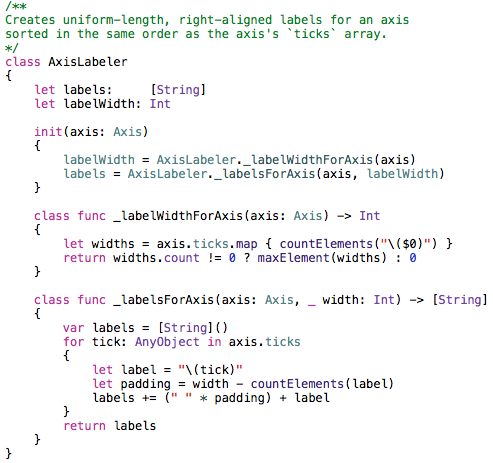
The _labelsForAxis method seen above uses a convenient shorthand for creating the whitespace needed to right-align a label’s text. It looks like I’m multiplying a whitespace character by the number of spaces needed to right-align the text. A similar * operator function is used by the TextPalette class, which constructs strings used when rendering a histogram.
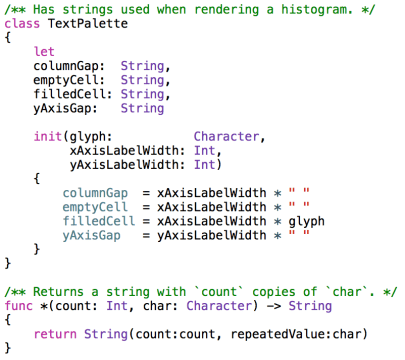
Rendering a histogram involves using two AxisLabeler objects (one per axis) and a TextPalette. In order to avoid having many methods with long repetitive parameter lists, I made a RenderContext class that creates and exposes all of the commonly used rendering objects.
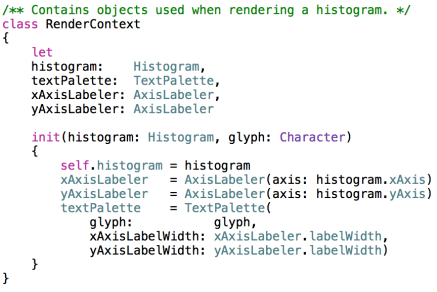
An instance of RenderContext is created by HistogramRenderer before initiating the render process.
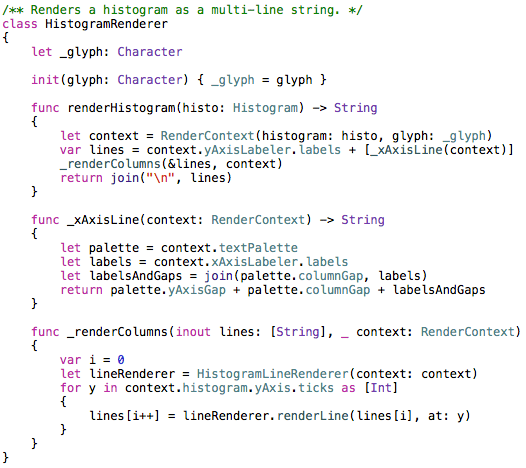
Once a RenderContext is created the renderer makes a String array that contains a line for every Y axis tick and one line for the entire X axis. Then a HistogramLineRenderer is used to populate each Y axis line.
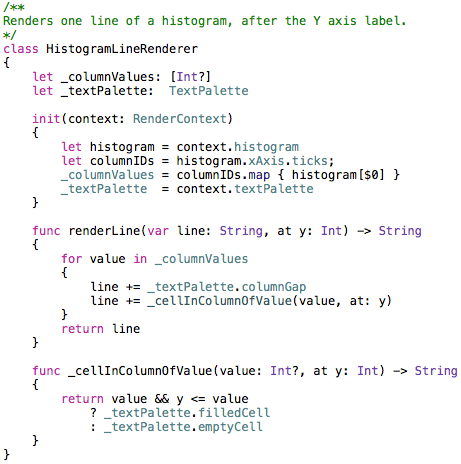
Each line above the X axis in a histogram contains a set of “cells.” A cell’s width is equal to the width of the X axis labels. It can contain either the glyph used to draw a column or whitespace. The gaps between columns are always whitespace. Once all of the lines have been filled with glyphs and whitespace, they are joined together with newlines and returned by the HistogramRenderer.

Lessons Learned

I learned a lot about Swift while writing this program. The language has several features, such as excellent closure syntax and operator functions, that make it easy to write concise yet expressive code.

It quickly became apparent that a class’s initializer(s) often must rely on type methods (as opposed to instance methods) to create the values for non-optional properties, unless you’re comfortable having large, sprawling initializers. This is because the compiler won’t let you call an instance method until all of the object’s properties have been assigned.

The built-in collection transformation methods, such as map, are extremely useful. When used with trailing closure syntax these methods provide an elegant way to perform a lot of work with little code.

Swift looks very promising!

The Xcode 6 project reviewed here can be found on Github:
https://github.com/ijoshsmith/Swiftogram

Posted in Swift | 2 Comments

Curried Functions in Swift

Apple’s programming language Swift includes several features commonly used in functional programming but unheard of in more mainstream languages. This blog post explores the lesser-known feature known as curried functions. I first encountered currying when studying the functional language Haskell, which is fundamentally based on function currying. Swift makes function currying available but a developer is never required to make use of it. It’s just another tool in a Swift developer’s toolbox.

The basic idea behind currying is that a function can be partially applied, meaning that some of its parameter values can be specified (bound) before the function is called. Partial function application yields a new function. That new function’s signature is based on the original function’s signature, but the bound parameters are not in the parameter list.

For example, suppose the original function’s parameter list is a String and an Int. If you bind the String parameter, you get back a new function whose parameter list only includes an Int. When you call that partially applied function and pass it an Int value, the function still has the bound String parameter value available to it.

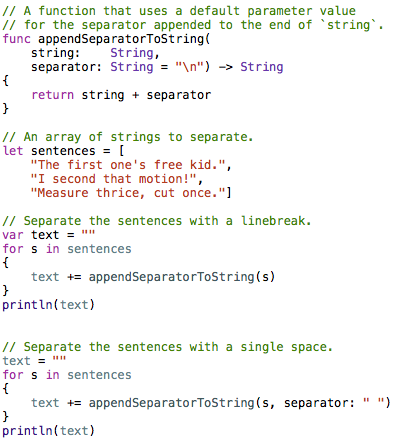
Another way to think about currying is to contrast it to using a function with a default parameter value. In Swift a function’s parameters can have default values specified in the function declaration. If you call a function and don’t provide an argument for a parameter, that parameter’s default value will be passed to the function (assuming the parameter was given a default value by the function’s author). A default parameter value is a compile-time binding between a parameter and a constant value. A new default value cannot be assigned to a parameter at run-time. In contrast, currying effectively allows you to specify a parameter’s default value at run-time. The difference is that partially applying a function results in a new function being born. Only that new function knows the value of the bound parameter. Unlike using a default parameter, code which calls that new function cannot specify a different value for the bound parameter. Once it has been bound via partial function application, that parameter value is set in stone.

Here is a simple example showing the similarities and differences between using default parameter values and curried functions. The following code sample shows how to append a separator to the end of a string. The first function in the code listing uses a default value of “\n” for the separator parameter. Later in the code a different separator, whitespace, is used instead of a newline.

Using a Default Parameter Value

Using a default parameter value

The output created by running this code is shown below:

The first one's free kid.
I second that motion!
Measure thrice, cut once.

The first one's free kid. I second that motion! Measure thrice, cut once.

The next code listing shows how to accomplish the same thing using function currying. Note that when the appendSeparator method is called it returns a new function, not a String. This new function has the separator parameter bound to whatever String was passed to the appendSeparator function. The new function takes a String and returns a String which ends with the separator passed to appendSeparator.

Using a Curried Function

Using a curried function

This example is trivial but it shows the essential concept of function currying in action. Binding some of a function’s parameters to create a simpler function makes it is possible to restrict knowledge of what parameter values should be used to only the places in an application that should have that knowledge. This can enable classes to be selectively ignorant about certain aspects of how a function should be used, and reduce coupling between collaborating objects.

Posted in Swift | Tagged , | 19 Comments

Instantiating Classes by Name in Swift

This article demonstrates how to create a Swift class instance based solely on the class name and possibly an argument for its initializer method. It relies on Objective-C interop to perform the actual object creation, which is hidden behind a generic Swift convenience class called ObjectFactory.

The source code reviewed below can be found on Github:
https://github.com/ijoshsmith/swift-factory

This code was compiled and tested against Xcode 6 Beta 5.

Background

Over the years I’ve written several components in Objective-C that I use in almost all of my iOS projects. A few of them critically depend on the ability to instantiate a class based on a string that contains the class’s name. Those strings might come from a configuration file or be the result of concatenating strings based on a class naming convention.

In Objective-C that is easy as pie, just call NSClassFromString(aClassName) and then alloc/init the Class it returns. However, now that Swift is destined to become the lingua franca of iOS I decided to investigate how one might implement these reusable components in Swift. Instantiating classes by name turned out to be a stumbling block, as it appears that Swift does not yet support this.

Disclaimer: I’ve only been studying Swift since it was publicly debuted two days ago. This entire blog post might be obviated by some utility function I haven’t been able to find or will soon be added to the API in the first official Swift release.

Introducing ObjectFactory

My class named ObjectFactory creates Swift class instances based on the class name. It supports creating objects with either a parameterless initializer or an initializer that takes exactly one parameter. The class could easily be modified to support initializers with more parameters, if necessary.

There is a restriction that ObjectFactory imposes on the classes it can instantiate: they must derive (directly or indirectly) from NSObject. By default Swift classes do not derive from NSObject. There is no harm in making a Swift class derive from NSObject, though it might not always be possible based on a project’s specific class inheritance needs. The reason why this restriction exists will become apparent later in this article when I explain how ObjectFactory works.

Using ObjectFactory

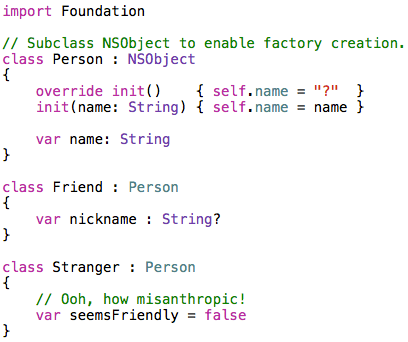
Suppose your application has the following three classes: Person, Friend, and Stranger. The latter two are Person subclasses, and Person is an NSObject.

If you need to create instances of Stranger and Friend based on the name of their classes you could use one of ObjectFactory’s createInstance methods. The simpler version of the method just requires you to pass it a class name that is prefixed by its enclosing namespace, such as “MyApp.SomeClassName”. The other version of the createInstance method allows you to specify which single-parameter initializer method to use and what value its argument should be.

Here is the output of this program:

Created a Stranger
Friend name = Steve

How it works

As I mentioned before, there does not appear to be a way to instantiate a class by name in the Swift API. I was able to get an object that represents a class (named AnyClass), but there was no way to get from there to a live instance of that class. So instead, I hopped into the parallel universe of Objective-C to create an object, which then gets returned back to Swift. This is why ObjectFactory can only work with NSObject subclasses; I’m relying on Objective-C to alloc/init a new object, and those methods are defined by NSObject.

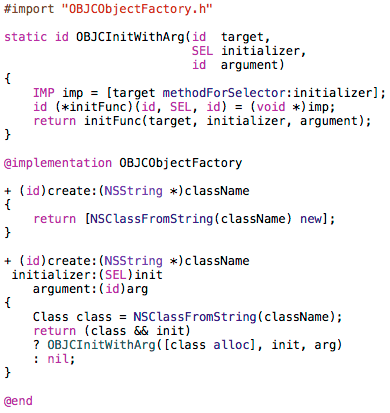
Here is the ObjectFactory class, which is just a Swift convenience API over the Objective-C code that does the real work.

ObjectFactory relies on OBJCObjectFactory to create and initialize new objects. Once you’ve added that Objective-C class’s header and implementation files to your project, Xcode will create a “bridging header” file for you, which allows you to expose Objective-C classes to your Swift code. Be sure to add this to your project’s bridging header file:

bridge

This class’s header file is shown below.

The implementation of OBJCObjectFactory is short and straightforward, if you know Objective-C that is! Note that the single-parameter initializer selector is invoked through a pointer to a function, instead of the standard performSelector:withObject: method, because it eliminates a compiler warning and establishes a pattern that can be extended to include an arbitrary number of initializer arguments.

Feel free to use ObjectFactory in your apps, if you need it. Please let me know if you find a pure Swift way to do this!

Posted in Swift | Tagged | 16 Comments