Sneak Peek: Reference vs. Pointer

It’s time to let the cat out of the bag.

I’m writing a book that explains iOS programming to .NET developers! I have written seven of the twelve chapters and, I must say, it’s really coming together nicely so far. This book will be a companion manual for any .NET developer looking to make the leap into iOS programming. Considering the explosive growth in demand for iOS developers these days, I think a lot of people might benefit from a book like this.

I’m writing the book I wished for when I started teaching myself native iOS programming. It explains the terms and concepts involved with iOS programming by relating them to your knowledge of .NET development.

Here is a sneak peek from Chapter 4, titled ‘From C# to Objective-C’…


Reference vs. Pointer

Every object in a program exists at a unique memory address. Most of the time C# code stores the location of an object as a variable in the form of a reference. In contrast, Objective-C stores the memory address as a variable in the form of a pointer. C# also supports pointers, but only in blocks of code explicitly marked as ‘unsafe.’ Objective-C only supports pointers.

In iOS software every pointer consumes four bytes of memory, according to the sizeof() operator. Those bytes store a number. That number happens to be a memory address of either zero (which is known as nil) or an address at which a data object should exist. Note that I did not say a data object must exist at the address stored in a non-nil pointer. This is the fundamental difference between pointers and references. Pointers are more flexible than references, but less safe.

Another way to think about the difference between references and pointers is to consider how they are used. In .NET programming there is a garbage collector (GC) that removes unreferenced objects from memory. The GC also moves objects around on the heap (the section of memory where objects are allocated) in order to create contiguous blocks of available memory, making subsequent allocations faster. The fact that objects are moving around on the heap is completely irrelevant to C# code that only uses references to access those objects. The .NET runtime takes care of adjusting references to ensure they point to relocated objects. A reference points to an object, regardless of where it currently happens to be in memory.

Pointers, on the other hand, point to a specific location in an application’s memory address space. If an object is moved, pointers to the object’s original memory address are not automatically updated with the new address. However, since the Objective-C runtime on iOS does not have a garbage collector, and objects do not move around in memory on their own, this is not as much of a problem as one might think. The additional burden imposed by pointers on application developers is partially mitigated by Automatic Reference Counting, which I review in Chapter 5. Also, what is lost in safety and convenience by not having references is compensated by the flexibility of using pointers.


Stay tuned for more…

[UPDATE]

The book has been published! Please visit this page for more information.

Posted in iOS Programming for .NET Developers, Objective-C | 47 Comments

What to do when Xcode 4 won’t open your project

If you might find yourself in a situation where you try to open an Xcode project but it only shows a blank window with “No Editor” in the middle, don’t panic! Instead of creating a new project from scratch, or leaping through the nearest window to an untimely demise, simply “Show Package Contents” on the xcodeproj file in Finder, then delete the workspace file. That eliminates whatever the underlying problem is, allowing you to then open up the project again. Of course, if you have more than one project in your workspace this quick fix will introduce additional headache, as you will need to then recreate the workspace.

Posted in Xcode 4 | 9 Comments

Objective-C Genetic Algorithm That Solves The 8 Queens Puzzle

Introduction

In my previous post I explained the basics of genetic algorithms, and provided a very simple example written in Objective-C. In this post I will dive deeper into the fascinating world of genetic algorithms and show a more sophisticated solution to a more difficult problem, known as the 8 Queens puzzle.

The demo program can be downloaded from github here.

Debt of gratitude

My study of genetic algorithms has been largely based on reading blog posts written by other developers. The post I found most helpful, and which inspired me to tackle the 8 Queens puzzle, can be found on the HandCraftsman blog (a.k.a. Clinton’s Blog). He has posted two separate solutions to this puzzle, one written in C# and the other in some language called Go. The post I studied the most, and from which my algorithm’s gene encoding system is based, can be found here. My algorithm is heavily influenced by Clinton’s but different in several ways.

The 8 Queens Puzzle

Back in 1848 some chess guru named Max Bezzel posed the question of how can you arrange eight queens on a chessboard such that none of them can attack each other. Some seriously smart people, including the almighty Gauss himself, gave this problem a lot of thought and it soon became a well-known problem amongst mathematicians. These days it has become a common problem for Computer Science students to solve while learning about things like constraint programming, logic programming, or genetic algorithms.

Learn more about the 8 Queens puzzle here.

Not the fastest draw in the West

I should point out that genetic algorithms are not the fastest way to solve the 8 Queens puzzle. There are many other ways to solve it, some of which can find all ninety-two distinct solutions to the puzzle in less than one second. It took my algorithm just under an hour on a decent MacBook Pro to find all ninety-two distinct solutions.

I’m OK with that. I didn’t set out to write the fastest way to solve the 8 Queens puzzle. Instead, I used the 8 Queens puzzle as an interesting problem with which I could explore designing and implementing genetic algorithms.

From Hello World to 8 Queens

In my introductory post about genetic algorithms I reviewed a very simple example; an algorithm that evolves randomly generated strings to match a string typed in by the user. In that algorithm the genetic sequence stored in a chromosome has a direct, literal relationship with the problem domain. In other words, the characters/genes in the string/chromosome can be compared to the user input string to see if the chromosome is an exact match. In that contrived example the genes are not being used to encode information about a problem domain: they are that information.

In such a simple example it was not possible to create a genotype-phenotype distinction. A genetic algorithm that solves the 8 Queens puzzle, on the other hand, is a step up in complexity. Genes representing a possible solution to the 8 Queens puzzle will be meaningless by themselves. They must be projected, or, to stick with terms used in biology, translated, into information about the problem domain. This is similar to how nucleotides in DNA are translated into functional proteins within your cells.

Learning from my mistakes

Designing an appropriate genetic encoding system, and determining what information the genes should encode, is of crucial importance to creating a successful genetic algorithm. I know this from experience. My first attempt didn’t work out. I am going to explain my faulty reasoning, and what I learned from it, to better illustrate why the encoding system I eventually created works well.

My initial thought about how to encode information to solve the 8 Queens puzzle was to have a gene sequence consisting of sixty-four genes, since there are 8×8 squares on a chessboard. Each gene would represent one square of the chessboard and encode the binary state of a square (queen/no-queen). Each gene would be stored as a character in a string. The first gene would represent the top-left square on the chessboard, the ninth gene would represent the first square in the second row, the last gene would represent the bottom-right square, etc.

I started implementing a genetic algorithm using this encoding system, but soon ran into a problem indicative of a serious design flaw. My code needed to keep enforcing the rule that each chromosome must have exactly eight genes that represent a queen. This problem appeared when creating a new chromosome with randomly generated genes, and when combining the gene sequences of two mating chromosomes.

The problem around mating chromosomes and ensuring a child’s genes contained exactly eight “queen genes” was particularly troubling. Adding and removing queen genes willy-nilly from each new gene sequence meant introducing a lot more randomization into the algorithm. Genetic algorithms rely on randomness for both creating the initial population’s gene sequences and introducing mutations to subsequent generations, but those are highly controlled and intentional randomizations.

The algorithm’s crossover method, which is the fancy name for how it combines segments from two gene sequences to form a new one, should not introduce a high degree of randomness that significantly alters the combined gene sequence. Doing so renders the algorithm’s fitness function pointless. What’s the point in mating the fittest chromosomes if you always make a large number of random modifications to their children?

The fundamental problem with my initial encoding system was that it stored irrelevant information about the problem domain. It encoded the state of all sixty-four squares on the chessboard. Producing new gene sequences involved a lot of clean up work, which introduced inappropriate randomization. A well-designed encoding system would not include superfluous information about the chessboard.

Designing a proper encoding system

A solution to the 8 Queens puzzle can be expressed as a set of eight data points. Each data point represents a square of a chessboard on which a queen exists. Therefore, each chromosome used in a genetic algorithm that solves the 8 Queens puzzle should consist of eight genes, each of which identifies a square of a chessboard in which a queen exists. Rather than store the binary state of all sixty-four squares, the gene sequence should store only the locations of the queens.

My genetic algorithm represents the top-left square on the chessboard with the character zero (‘0’) and the bottom-right square with lowercase p (‘p’). This is a range of sixty-four characters, according to the ASCII character codes. In other words, ‘p’ – ‘0’ is equal to 64. My choice of using the character for zero as the initial character is mostly arbitrary, but I liked the idea of the first square being represented with a zero (as in, squares[0]).

In the demo program, there is a class that is used to store a solution to the 8 Queens puzzle and draw a diagram of it to the console. An example of its output is seen below:

. Q . . . . . . 
. . . . . Q . . 
. . . . . . . Q 
. . Q . . . . . 
Q . . . . . . . 
. . . Q . . . . 
. . . . . . Q . 
. . . . Q . . .

That class is named JAS8QueensSolution. It contains the following methods that draw the solution to the console window. This code shows how information from the problem domain (squares on a chessboard) can be translated via the genetic encoding system to check for the presence of a queen at a particular chessboard square.
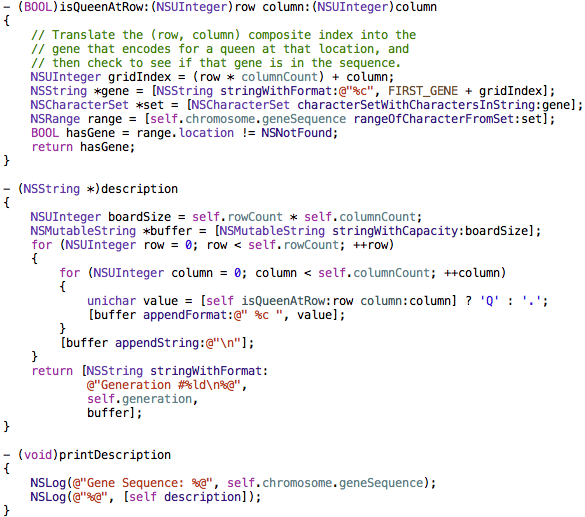
The genetic encoding system is also used when evaluating the fitness of a chromosome’s gene sequence, which we will look at next.

Working out the fitness function

In my previous blog post about genetic algorithms the demo program’s fitness function was very simple. It took a chromosome (which simply wraps a string) and compared each character/gene against the corresponding character/gene from the target string. The greater the delta between the two characters/genes, the lower the chromosome’s fitness became. A chromosome with a fitness of zero meant it was an exact match to the target string; anything below zero meant the chromosome was not an exact match.

That simplicity is not possible when genes do not directly map to, or represent, the problem domain. A level of abstraction exists which allows a gene in the 8 Queens algorithm to encode information about a square of a chessboard on which a queen exists. As such, the fitness function for my 8 Queens genetic algorithm must translate each gene into information about the problem domain while evaluating a chromosome’s fitness.

An interesting quirk about the 8 Queens puzzle is that the other genes in a chromosome determine a given gene’s fitness. A gene represents the location of a queen, and a queen’s safety is contingent upon the locations of the other queens. It turns out that the fitness function can be significantly optimized due to this quirk. Instead of searching for queens occupying squares that are North, Northeast, East, Southeast, South, Southwest, West, and Northwest of a given queen, we only need to search half of those directions (the demo program searches North, Northeast, East, and Southeast.) For example, if a queen is South of another queen, searching North from both of those queens will cause the incompatible locations to be detected. There is no need to search South as well.

Here is the fitness property from JAS8QueensChromosome that calculates the chromosome’s fitness.
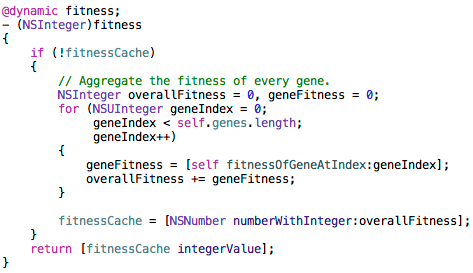
That property calculates the fitness of each gene and caches the sum. The result is cached to improve performance, since this property can be accessed multiple times for a chromosome. The helper method that calculates the fitness of a given gene is seen here:
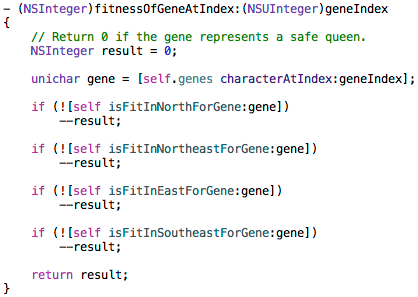
This method searches in four directions, as discussed earlier, to look for other queens that are attacking the queen represented by the gene at the given index. Let’s take a look at the code that searches North and East for attacking queens. This code shows how the genetic encoding system is used to translate genes into information about the problem domain, namely, the squares in which queens exist.
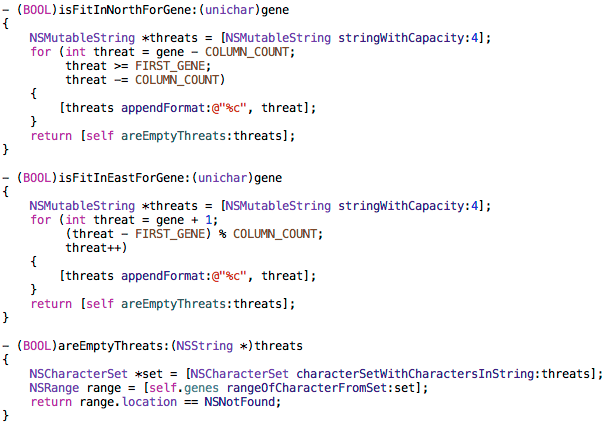
The translation of genetic information to problem domain information occurs in the for() loops. The ‘threat’ variable in those loops identifies a chessboard square. A list of chessboard square identifiers is appended together and passed to the areEmptyThreats: method for analysis. That method checks to see if the chromosome’s gene sequence contains any of those chessboard square identifiers. If so, that means a queens exists on one or more of those squares.

Breeding the next generation

Because each chromosome contains exactly the information needed to represent a solution to the 8 Queens puzzle, the code to mate two chromosomes is very straightforward. All of the problems I faced with my original genetic encoding system, as described earlier, disappeared when I used the system seen above. Here is the code from JAS8QueensChromosome that mates one chromosome with another:
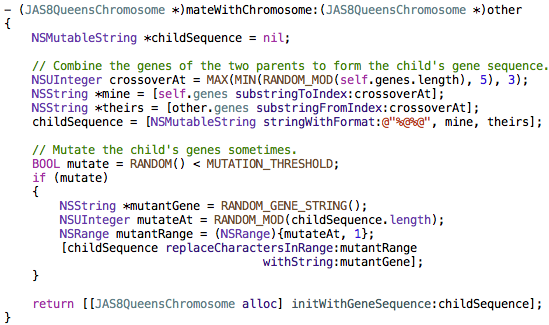
The chromosomes are mated after the algorithm has evaluated the fitness of every chromosome in the population to look for valid solutions to the 8 Queens puzzle. Below is the code from JAS8QueensAlgorithm that selects the best chromosomes from the population, along with a small number of the non-elite, and creates the next generation.

Wrapping up

There is a lot more going on in the demo program than what I’ve shown here, so I encourage you to grab it off github and take a look. One particular point of interest is how JAS8QueensChromosome overrides the hash and isEqual: methods to help the algorithm avoid adding equivalent chromosomes to the population.

The demo program can be downloaded from github here.

Thanks for stopping by!

Posted in Genetic Algorithms, Objective-C | 3 Comments

Simple Genetic Algorithm in Objective-C

Introduction

This article explores a simple genetic algorithm I wrote in Objective-C. The purpose of this article is to introduce the basics of genetic algorithms to someone new to the topic, as well as show a fully functional example of such an algorithm.

I am by no means an expert in the field of artificial intelligence. If you are looking for an authoritative voice on cutting-edge research in genetic algorithms, and this article’s title didn’t tip you off, please look elsewhere. If you’re looking for the “Hello, World!” of genetic algorithms written by a professional software developer, not an academic researcher, read on.

The demo program reviewed in this article is available on github.

The demo program

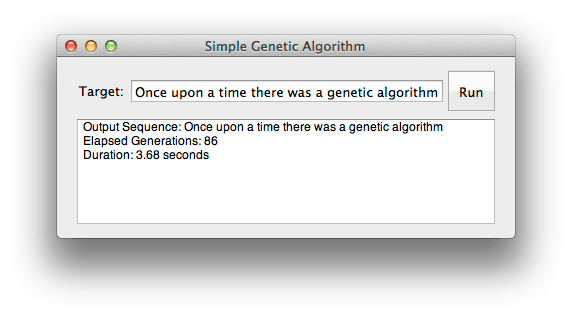
In this article we will review a genetic algorithm whose purpose is to construct a piece of text (i.e. a string) that you specify at run-time. Sounds simple, right? The tricky part is that the algorithm must start with nothing but randomly generated strings and somehow “evolve” them until one of the strings exactly matches the string you specified. The process of evolving the strings is where things get interesting. Here is a screenshot of the Cocoa desktop demo program I wrote to test out the algorithm.

This was my first time writing a Cocoa desktop program, so I’m sure I didn’t follow any Cocoa best practices. My bad!

Below is an abridged version of the output logged by the application while it evolved strings to match the input value of “Once upon a time there was a genetic algorithm”. Each line represents a generation, whose number is listed first, followed by the string in that generation closest to matching the input value.

#00: Rdne$cnfg"2L:ThDBA`awN!d`Z$f"xfsdgVo$Zx^V&oslq
#10: Rpdf!xppl!a tjle!sibs`"vbv#b!hgcbvje aimlumthl
#20: Onee!unoo"a"vhjd!tfese!var `"ffodtid"dlgrrishn
#30: Nnce!upon `"time#theqg wds a gfnduid#alfnritjm
#40: Once!upon a time!theqe!xas b henetid"algnqithm
#50: Once!upon a time!theqe was a genetid"algnrithm
#60: Once upoo a time shese was a genetic amgorjshm
#70: Once upoo a time theqe was a genetic!algorithm
#80: Once upoo a time these was a genetic algorithm
#86: Once upon a time there was a genetic algorithm

I designed and wrote this genetic algorithm, but only after reading many blog posts showing how other people attacked the same problem. My approach involves a couple of novel twists, such as the “population shuffling” that we’ll examine later on, but I’m definitely standing on the shoulders of giants here.

On the origin of genetic algorithms

The heady world of artificial intelligence and machine learning is a fascinating place. Many of the concepts are imported from other fields of research. For example, neural networks are programs that mimic aspects of the brain in order to get some tricky job done, such as recognizing letters and numbers in your handwriting.

Genetic algorithms are based on concepts from the field of biology. They take conceptual root in Darwinian evolution by natural selection. The name genetic algorithm makes sense because these algorithms emulate the mechanisms by which heritable traits are transmitted from parent to offspring, namely the genes found in DNA.

Don’t take the “evolution by natural selection” analogy too seriously. Your code can do things that don’t happen in nature, without causing your algorithm to somehow be wrong or invalid. Genetic algorithms were inspired by what is observed in the natural world, but they do not need to precisely imitate it. If one took the analogy too seriously, and learned how these algorithms actually work, one would have to conclude that the biological world is a huge, non-stop, rampant orgy of incestual mutants. That’s not an accurate description of the world we live in (I hope!).

Components of a genetic algorithm

For our purposes in this article the following quick summary of how genetic algorithms work will suffice. In the next section I provide some other sites to check out if you want a more comprehensive conceptual background.

  • Gene – A unit of information that encodes part of a potential solution to the problem being solved. In the demo program a gene is stored as a character in a string.
  • Chromosome – A sequence of genes that might be a good solution to the problem being solved. Some people refer to this as an “individual” instead of “chromosome.” In the demo program a chromosome is represented as a JASChromosome object, which uses an NSMutableString to store its gene sequence.
  • Population – All of the chromosomes processed by the genetic algorithm. The algorithm mates chromosomes from the population to produce a new generation of chromosomes, which are added to the population.
  • Fitness function – Some logic that evaluates a chromosome and returns a numeric value indicating the “fitness” of the chromosome’s genes for solving whatever problem is being solved.
  • Selection method – Some logic that figures out which chromosomes should mate in order to create the next generation of chromosomes. In the demo program the chromosomes are rather lazy and will mate with whoever happens to live next door.
  • Crossover method – Some logic that determines how to combine the genes from each chromosome while they are mating. In the demo program the fitness of the genes at the same gene sequence index from both parents are compared, and the fitter gene is given to the child. This is an example of my algorithm performing an optimization that doesn’t happen in nature, but who cares?
  • Mutation method – Some procedure that randomly changes a chromosome’s gene sequence once in a while. In the demo program, mutations occur for about 20% of the chromosomes immediately after they’re born.

The hard part is figuring out a good fitness function, selection method, crossover method, and mutation method for the problem your algorithm is supposed to solve. The rest is just scaffolding and housekeeping.

Learn (a lot) more

If you want to learn more about the theory of genetic algorithms, you’re in luck. There’s a ton of great material on the Web. It seems like standard operating procedure these days to check what Wikipedia has to say on the topic, but I found this blog post much more digestible and useful.

If you prefer to see a C# implementation be sure to check out this blog post, which is part of an excellent series about genetic algorithms.

Another approachable, and rather hilarious, introduction to the topic with an example in Python can be found here.

How my algorithm works

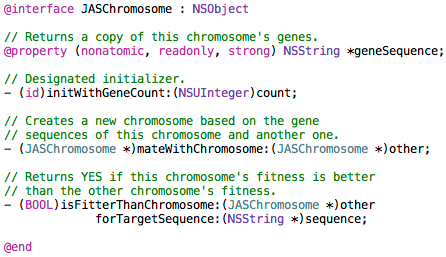
I split the algorithm into two classes: JASGeneticAlgo and JASChromosome. The JASGeneticAlgo class creates, breeds, and analyzes a collection of JASChromosome objects. Each chromosome is capable of mating with other chromosomes, and determining how its fitness compares to another chromosome’s fitness. Here is the interface from JASChromosome.h:

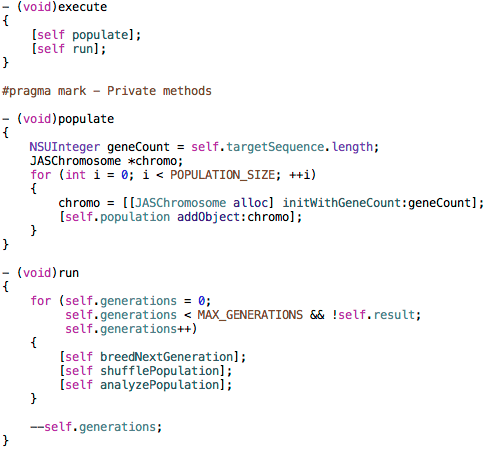
Now let’s turn our attention back to the JASGeneticAlgo class. After you instantiate that class, and provide it with the target sequence (the string typed in by the user), you send it the execute message to begin running the algorithm. The execute method from JASGeneticAlgo.m, and its two direct dependencies, are shown below.

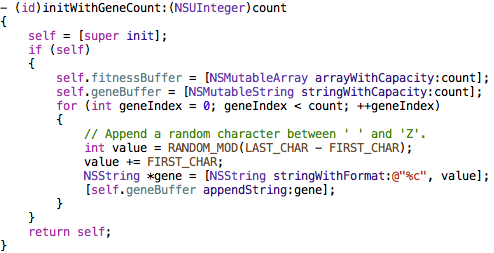
The populate method adds a bunch of chromosomes to the population array. Each chromosome has the same number of genes as the target sequence. In other words, each JASChromosome object has a string of random characters the same length as the user-defined input value. Here is the code from JASChromosome.m that shows how a chromosome is initialized.

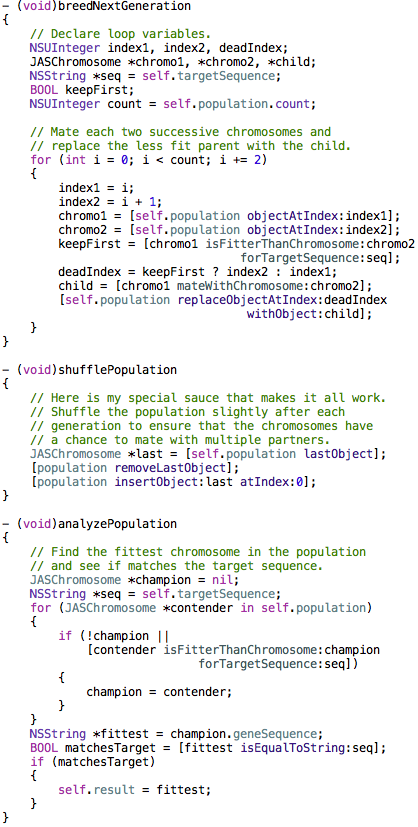
As seen above, the run method of JASGeneticAlgo has been decomposed into three methods: breedNextGeneration, shufflePopulation, and analyzePopulation. Those three methods from JASGeneticAlgo.m are shown below.

Note: In the full demo program source code, the analyzePopulation method logs information about the fittest chromosome from the current generation, which is why that method doesn’t just search for a chromosome whose gene sequence exactly matches the target sequence. I removed that logging code before taking a screenshot of the method, so that the code would visually fit on my blog.

My algorithm’s “selection method” can be found in the loop of the breedNextGeneration method and also in the shufflePopulation method. The selection method used here is to mate each chromosome with its neighbor, and then replace the less fit parent with the child chromosome. To avoid some of the horrific side effects of rampant incest, the shufflePopulation method moves the last chromosome in the array to the beginning of the array. This allows each chromosome to mate with both of its neighbors on an alternating basis. What a life…

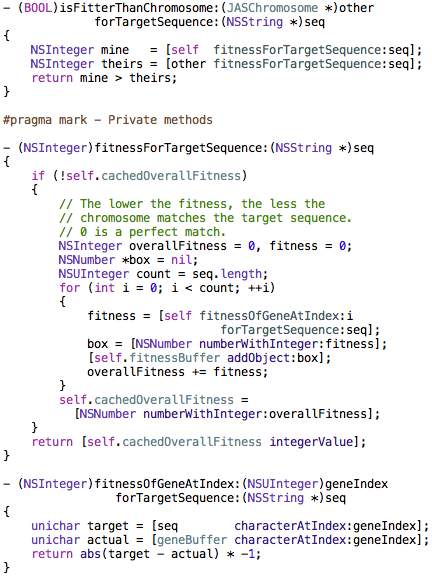
The algorithm’s fitness function is exposed by JASChromosome as the isFitterThanChromosome:forTargetSequence: method. That logic is shown below. The basic idea is that each character in the string is compared to the corresponding character in the target string. The numeric difference between the two characters is normalized to a negative number, where zero represents an exact match (perfect fitness). The fitness of each gene is aggregated into an overall fitness for the chromosome. Those overall fitness values can then be compared to each other, where a higher number is considered to be a chromosome with a better fitness. In this context, a fitness value of zero indicates that a chromosome’s gene sequence is an exact match of the target sequence.

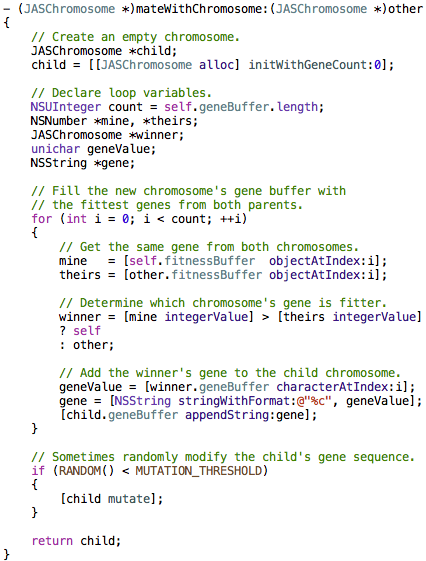
Next up is the mating ritual. This method in JASChromosome is responsible for creating a new chromosome based on two parent chromosomes. It contains the “crossover method” component of the genetic algorithm, which determines what genes to give to an offspring.

The crossover method makes an optimization that is specific to the particular problem being solved. It compares the parents’ genes and gives their child the better gene of the two. In more complicated problem spaces, where the genes themselves do not directly correspond to a potential solution but are only used to encode a more complicated solution, this optimization would usually not make any sense.

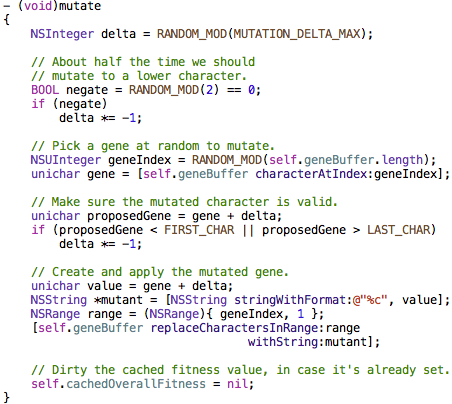
Lastly, we need to see how random mutations occur. As seen toward the end of the mateWithChromosome: method above, once in a while a new chromosome’s gene sequence is mutated. This adds more variety into the gene pool, which is usually necessary to arrive at a correct or optimal solution. Here is how mutations occur in a JASChromosome object.

If you are interested in diving into this code deeper, feel free to grab a copy off github here.

Summary

Genetic algorithms are an interesting and powerful way to find the solution to certain types of problems. They are great for finding something that you know how to look for, which is what the fitness function is all about. If a fitness function cannot be created to evaluate potential solutions to a problem, genetic algorithms won’t be much help in solving that problem.

The algorithm reviewed in this article has a very simple problem to solve. The genes in a chromosome directly map to a solution to the problem (i.e. characters of a string). When applied to more complicated problems, the genes in a chromosome become decoupled from the problem space and are used purely as a means of encoding information. To learn more about this fascinating step up in complexity, visit my next blog post about solving the 8 Queens puzzle.

Thanks for stopping by!

Posted in Genetic Algorithms, Objective-C | 14 Comments

iOS Developer Evangelist Job Opportunity

This blog post is my attempt at playing matchmaker. A buddy of mine is looking to hire an iOS developer evangelist. Here is the job description, as described by Colin himself…
 

Hi. Let me introduce myself. I’m Colin Eberhardt, and with our band of Xcode-wielding ninjas, we are ShinobiControls. Together, we are on a secret mission to make the life of every iOS developer easier. Our ninjas are carefully crafting iOS charts, grids and controls for you to make applications awesome. But to do this we need your help.

Our ninjas are masked and sworn to secrecy – treading the delicate pathways to Objective-C enlightenment under the cover of darkness. What we need is someone to help bring Shinobi into the light. Are you …

+ A prolific blogger?
+ An iOS guru with an active following?
+ Someone who is a confident presenter and speaker?
+ Controversial? Outspoken?

If you are any of the above, then we want to hear from you. We want someone to don the Shinobi headgear and go out into the world spreading the word. If you are a contractor / freelancer, this could be a part time role.

Interested? Meet me in the dead of night, behind the Apple sign on the Infinite Loop.

… or send me an email, ceberhardt@shinobicontrols.com, whichever is easiest.

Posted in Jobs | Comments Off on iOS Developer Evangelist Job Opportunity

Good mobile software is frugal

All software development requires discipline. Attention to detail,  adhering to important conventions, and the willingness to do things the right way are necessary traits for any software developer worthy of the title. But if you are writing code that will be run on a modern desktop, laptop, or server you don’t need to worry too much about writing frugal code. Not only are those computing beasts, but they’re usually plugged into a power outlet.

That all changes when you are writing code that will run on a battery-powered device with (relatively speaking) significantly less horsepower. Your code should follow Einstein’s famous advice of only doing what needs to be done; nothing more, nothing less. Every line of code that runs will suck some juice out of the battery. Every object created brings your app that much closer to using up the available memory, putting your process at risk of being killed by the operating system.

Some developers new to, or unfamiliar with, iOS development consider Objective-C to be some dinosaur language that Apple hasn’t bothered replacing with something more “modern” such as Java or C#. They are wrong. Objective-C, which is C with some object-oriented syntax accompanied by a lightweight runtime, does not burden the device with a garbage collector, JIT compiler, etc. Those luxuries can be great for desktop and server programming, but are overkill for mobile devices.

In the mobile world, Responsiveness is king and the Battery is his queen. Every line of code you write should aim to satisfy those two masters. Write frugal code. Your users will appreciate it.

Posted in Objective-C | 3 Comments

Installing Xcode 4.3.1 when App Store gives you the Silence Treatment

Today I had some free time, so I decided to upgrade my MacBook Pro to have the latest version of Xcode. Apple recently released Xcode 4.3.1 which supports the iOS 5.1 SDK. I figured it wouldn’t take more than an hour. Six and a half hours later, I am writing this post so others can hopefully avoid the frustration I just went through.

Quick Tip

If you can’t install Xcode 4.3.1 from the App Store after a failed attempt, open the Launchpad app, then open the Developer group, and delete the Xcode icon with the download progress bar. Then you can go back into App Store and restart the installation process.

The Gory Details

First I tried installing Xcode 4.3.1 using the App Store in OS X Lion, but my system froze 45 minutes into the download. That killed the installation process, and I was not able to restart the download/install, even after a reboot. When I attempted to install it again from the App Store, I’d click the Install button and nothing would happen. Once in a while it would ask me for password, but nothing beyond that.

Then I downloaded the DMG file from developer.apple.com, which took an hour or so, but when I finally opened it, I got an “invalid checksum” error. Grr.

So I redownloaded the DMG file, in case the initial download somehow got corrupted. Same result an hour later: invalid checksum. It turns out that if you click the “Stop” button on the dialog that is shown before the error message, it will skip verifying the checksum and Xcode will open up. But who knows what kind of trouble that is begging for…

At this point, I couldn’t install Xcode from the App Store and didn’t want to run some invalid DMG file all the time. After trying everything I could think of, I finally opened up the Launchpad app, in the Applications folder. In that app, I saw a “Developer” group full of icons. I opened it up and found an icon of Xcode with the “pause” symbol next to a download progress bar.

I then tapped and held on that Xcode icon in the Launchbar screen until the icons started jiggling, at which point I could delete the Xcode icon from the Developer group. Following that I closed Launchpad, opened up the App Store again, and was able to start installing Xcode again by clicking the Install button.

I hope this helps somebody out there.

Posted in Uncategorized | 4 Comments

Debugging exceptions in Xcode 4.2

One of the hidden gems in Xcode 4.2 is the “Exception Breakpoint” feature. Once you enable it, your debugging life becomes much easier because whenever an exception is thrown in your app, Xcode will bring up the line of code that caused the exception to occur. This is particularly useful if your call stack window is empty (which I have seen happen sometimes while working on iOS apps). Instead of relying on a brief error message in the Output pane, which doesn’t contain much more than the type of exception and its error message, you get to see exactly where the problem is!

You can add an Exception Breakpoint by opening up the Breakpoint Navigator pane, and clicking on the X button in the bottom left corner:

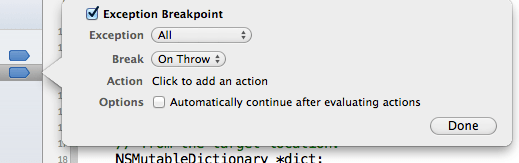
After clicking the “Add Exception Breakpoint…” menu item, you will see this breakpoint configuration view open up:

Click the Done button and you will the new Exception Breakpoint in your list of breakpoints. If you want to have all of your Xcode workspaces include the Exception Breakpoint, right-click (Ctrl + click) on it and open the “Move Breakpoint To” menu item:

After clicking “User” in the submenu, you will see that the Exception Breakpoint is in the User group of breakpoints. Open up another project and it automatically be included in the list of breakpoints.

Happy debugging!

Posted in Debugging, Xcode 4 | Tagged | 10 Comments

Great, free, short videos about Xcode 4

In case you haven’t already watched them, I suggest checking out the Xcode 4 video tutorials published by The Pragmatic Studio. Each of them is short and to the point, and free! Even though I have been using Xcode 4 since it was released, these videos had plenty of useful tips and tricks for me.

After watching some of their free videos about Xcode 4, I invested in the six-part video series about Core Animation: Creating a Compelling User Interface with Core Animation. I’m really excited to watch that series!

This message was not endorsed or sponsored by The Pragmatic Studio. 😀

Posted in Xcode 4 | 1 Comment

Jumping to counterpart files in Xcode 4.1

I upgraded my MacBook Pro today to the new Lion version of the OSX operating system. After downloading and installing Lion, I was forced to upgrade Xcode from version 4 to 4.1. It took quite a while to complete. After everything was updated I fired up Xcode 4.1 to kick the tires.

Much to my dismay, I found that the “Jump to next/previous counterpart” command that I constantly use can no longer be performed via the trackpad. In Xcode 4 I would use a three-finger vertical swipe to move between header (.h) and implementation (.m) files, roughly 56,000 times per coding session. That command no longer can be performed with that super-convenient gesture. I can’t imagine why Apple decided to remove support for that gesture. I can’t find a way to re-enable it, either.

Fortunately, the “Jump to next/previous counterpart” feature was not entirely removed. You can still access it via the Navigate menu, or using the default key bindings of Control+Command+UpArrow and Control+Command+DownArrow.

On a similar note, navigating back and forth between files that you’ve viewed is no longer available via the trackpad (via three-finger horizontal swipes). Instead use Control+Command+LeftArrow to go back in the navigation history, and Control+Command+RightArrow to go forward in it.

Those are the default key bindings. If you would like to customize them, open the Xcode menu item, then click the Preferences… item. In the window that opens, click the Key Bindings button and scroll down to the commands you would like to map to different keys.

If you know how to re-enable the trackpad gestures, please let me know!

Posted in Xcode 4 | 6 Comments