Save 20% on iOS Programming for .NET Developers this month

If you buy a paperback copy of iOS Programming for .NET Developers this month (October, 2012) be sure to use this coupon code to save 20% on your purchase: OCTBOOKS12

Visit Lulu.com to pick up your copy and get started learning one of the most in-demand skills on the market today.


Posted in iOS Programming for .NET Developers | 5 Comments

Determine the size of a View by inspecting its NIB

I was exploring the UICollectionView API tonight and stumbled upon an old problem. Both UITableView and UICollectionView ask their delegate for size information about the cells they display. When creating cells in separate XIB files, which I normally do, this means that the delegate must somehow know how big the root View is in that XIB. The easiest way to do that is evil: hard-code the cell’s size in the delegate. Duplication! Yuck!! No more!!!

It dawned on me that this entire problem can be avoided by doing a one-time lookup of the View’s natural size, as it exists in the XIB file (and, at run-time, in the view’s NIB). I posted a Gist on GitHub that shows my simple solution:


// This code assumes that ARC is enabled.
// Returns the size of this View in its NIB.
+ (CGSize)preferredSize
{
static NSValue *sizeBox = nil;
static dispatch_once_t onceToken;
dispatch_once(&onceToken, ^{
// Assumption: The XIB file name matches this UIView subclass name.
UINib *nib = [UINib nibWithNibName:NSStringFromClass(self) bundle:nil];
// Assumption: The XIB file only contains a single root UIView.
UIView *rootView = [[nib instantiateWithOwner:nil options:nil] lastObject];
// Cache the size of the UIView in its natural state.
sizeBox = [NSValue valueWithCGSize:rootView.frame.size];
});
return [sizeBox CGSizeValue];
}
/* Example usage
– (CGSize)collectionView:(UICollectionView *)collectionView
layout:(UICollectionViewLayout*)collectionViewLayout
sizeForItemAtIndexPath:(NSIndexPath *)indexPath
{
return [JASCollectionViewCell preferredSize];
}
*/

Happy coding!

Posted in Interface Builder, Tips and Tricks, UICollectionView, UITableView | Comments Off on Determine the size of a View by inspecting its NIB

Brief overview of Auto Layout in iOS 6

This blog post examines the basics of Auto Layout in iOS 6 and suggests resources for learning more about the topic.

Introduction to Auto Layout

Starting with iOS 6 Apple has given developers a powerful new way to create user interfaces that intelligently adapt to layout changes. This SDK addition, known as Auto Layout, enables a developer to express spatial relationships between views, leaving UIKit to update each view’s frame as needed to honor them. Relationships are expressed via layout constraints, which are objects of type NSLayoutConstraint, that can be added to a view by passing the addConstraint: or addConstraints: messages to it.

Auto Layout replaces the “springs and struts” autosizing layout mechanism used in the past. All new XIB and storyboard files have Auto Layout enabled by default. It is possible to port old views to use Auto Layout because it is smart enough to translate autosizing information into layout constraints.

The fact that Auto Layout was released at the same time as iPhone 5 is no coincidence. With iPhone 5’s screen being 4 inches tall, instead of the traditional 3.5 inches, there is a more pressing need to create adaptable user interfaces. If the rumored mini iPad is ever released, this concern will be even more pervasive for iOS developers. However, for simple views the old autosizing model works fine. For example, an app I have been developing at work relies heavily on UITableView and was created using autosizing, for running on iOS 5 and iPhone 4. When we tested the app out on iOS 6 and iPhone 5 simulator, there were almost no UI layout problems. For more complicated and custom user interfaces, however, the outcome probably won’t be as pain-free.

Auto Layout is also very helpful for supporting internationalization. Not only does it make the work of accommodating variable length display text easier, it also intrinsically supports right-to-left languages, such as Hebrew and Arabic. In the Auto Layout API the terms “leading” and “trailing” are used to generically refer to the start and end of a line, respectively. For left-to-right languages, such as English, leading means left and trailing means right. For right-to-left languages, it’s reversed. By relying on these generic concepts built into the API, it frees you, the application developer, from needing to take such locale-specific issues into account when building views.

How to use Auto Layout

Interface Builder (IB) now has support for working with layout constraints in an iOS app. It allows you to create and configure layout constraints on views without having to write a line of code. The screenshot below shows how constraints are now part of the document outline, and how the selected constraint is highlighted with a white border in the visual designer.

There is an ASCII-art inspired language named Visual Format Language (VFL) that can be used to ideographically express relationships between views. VFL text is written in code files, not IB, and acts as a facade over the cumbersome underlying API. Similar to the layout constraints support in IB, this language supports a subset of the functionality available in the API.
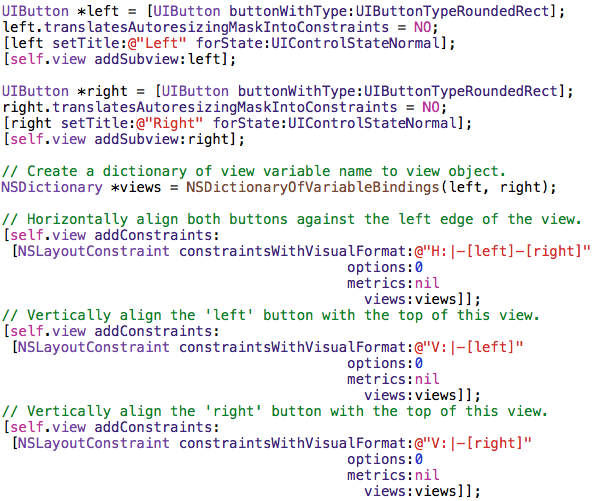
Most of the time the support in IB and VFL will cover your needs. However, the full power of layout constraints is available for situations that need it. Code can be written that creates individual NSLayoutConstraint objects and specifies all parameters required to create a single constraint, including things that are not available in other formats, such as a multiplier that allows a constraint to operate on a percentage of a value. The example below demonstrates this.

Cardinal rule of Auto Layout

There is something fundamental about Auto Layout that you must know in order to use it properly:

Constraints must provide enough information to determine one, and only one, size and location for a view.

If you don’t provide enough constraints, Auto Layout cannot accurately determine a view’s frame. If you provide too many constraints, such that multiple frames are possible for the same view, Auto Layout cannot accurately determine a view’s frame. If you violate the cardinal rule, either your app will crash or a large amount of helpful troubleshooting information will be logged to the Output window in Xcode.

Recommended Resources

There is far too much to say about Auto Layout for this introductory blog post. My goal here is to give a newcomer enough information about the topic so that it makes sense. If you have been working with iOS for a while, I’m sure you will see why it’s such an important topic to learn about. I suggest the following resources for an in-depth treatment of the subject:

The free tutorial on Ray Wenderlich’s site Beginning Auto Layout in iOS 6: Part 1/2

Both chapters about Auto Layout in Ray Wenderlich’s excellent book ‘iOS 6 by Tutorials

Apple’s documentation: Cocoa Auto Layout Guide

All three presentations about Auto Layout at WWDC 2012

I published a simple demo project that shows how to work with Auto Layout in code on GitHub.

Posted in Auto Layout, iOS 6 | Tagged , , | 5 Comments

Check out the iOS 6 Feast

Ray Wenderlich, whose iOS programming tutorials have helped countless aspiring iOS developers learn the trade, is now hosting a gigantic feast of iOS 6 goodness. He has dubbed it the iOS 6 Feast because there is course after course of delicious knowledge being served. His team has been hard at work preparing tutorials, books, and sample code to help make it easier for the rest of us to quickly learn about the new features in iOS 6.

The last course of Ray’s feast is a growing list of iOS-related products being given away for free. I decided to contribute a free copy of my book iOS Programming for .NET Developers.

Yesterday I bought, and have since been devouring, one of his team’s new books titled iOS 6 by Tutorials. It is an unbelievably large and comprehensive book about all of the great new features that iOS devs must know about to remain relevant and tasty in the job market. 😉

Posted in Books, iOS Programming for .NET Developers | 1 Comment

What’s so bad about delighting users?

This is a sponsored post from my good friends over at Infragistics.


Think of the last time you heard someone say “no, we can’t put that feature in the application because it might make our users more comfortable”.  It is probably difficult to think of a time someone said something like that to you because it’s not the way we think as developers and even as designers most of the time.  So, why then are many vocal people in the design community rallying against designs that try to incorporate real world elements?  There’s even a website dedicated to ridiculing these designs. I think these designers are missing the point.  The main reason these elements are put in the design in the first place is to add a bit of familiarity to the interface.  It’s to delight the user!

Skeuomorphism is a hot word these days.  The loose definition cited on Wikipedia is “an element of design or structure that serves little or no purpose in the artifact fashioned from the new material but was essential to the object made from the original material.”  A classic example from the physical world is the leather grain texture applied to a lot of vinyl automobile interiors.  Opponents of skeuomorphism will frequently point to Apple’s recent application designs for iOS and OS X.  The examples will include iCal which features stitched leather and torn paper edges and iBooks with its wood grain 3D bookshelf.  The latest app to catch fire was the Podcasts app which has a near replica of a reel to reel tape deck complete with fairly accurate mechanics.  It serves no purpose in the app other than to delight the user.  Are there more “authentically digital” ways to represent the same information this tape deck illustrates?  Sure.  Are they even half as engaging and cause people to write articles about them?  Nope.

I think it’s time we look at a different definition of skeuomorphism that I’d like to propose for the opponents of it.  Here’s how I’d like to redefine it: “taking an element from something most people are familiar with  and incorporating it into something most people aren’t familiar with”.  We tend to forget as developers and designers of applications that the majority of our users are not comfortable with computers and software.  Having that extra little bit of familiarity and delight might be the little thing that helps them connect with our app.  Is the use of skeuomorphism a little heavy handed at times?  I certainly would not argue with that.  I would argue that it is helping more than it is hurting though.  After all, what’s so bad about delighting users?

If you’d like to discuss this topic with me further, you can find me on Twitter @brentschooley.  My colleague Ambrose Little (@ambroselittle) also covered this topic in great detail here so please read that as well if you found this interesting.

About the Author

Twitter: @brentschooley
Blog: http://bit.ly/igbrent
Brief bio: Brent Schooley is a technical evangelist for Infragistics. His
current focuses include mobile technologies and Windows 8. He is a
developer who focuses on good design. He is the author of “Designing
for Windows 8“.

Posted in User Experience | 4 Comments

Preparing for an iOS Developer Job Interview

Do you have an interview lined up for an iOS development gig and want to make sure you’ve got all your bases covered? Check out this article I wrote about preparing for iOS developer job interviews, recently published by Software Developer’s Journal. It is available in the free “teaser” preview of this month’s edition. The article covers ten essential topics about native iOS development that you should know before walking in the door to talk shop.

Click here to visit their site and download the free edition. If you want to continue your iOS education, check out my book iOS Programming for .NET Developers for the in-depth treatment!

Posted in iOS Programming for .NET Developers, Jobs | Comments Off on Preparing for an iOS Developer Job Interview

Colin Eberhardt reviews iOS Programming for .NET Developers

A fellow by the name of Colin Eberhardt in the U.K. has reviewed my book that teaches .NET devs how to write iPhone and iPad apps. Colin’s review of iOS Programming for .NET Developers is circumspect and has reasonable critiques. He summarizes the review with a few sentences that made me sigh with relief, because they confirm that I succeeded in writing a book that .NET developers gain real value by reading. Colin writes…

“What makes this book unique is that it helps you leverage your existing skills in a way that you would find very hard to do by yourself. The similarities between the two environments are far from obvious, but I am happy to say that there are a great many! I feel that reading this book has increased my comprehension of iOS application development far quicker than a standard text on learning iOS would have allowed.”

Visit Book Review: iOS Programming for .NET Developers for the full review.

Thanks for the review, Colin!

Posted in iOS Programming for .NET Developers | 5 Comments

Objective-C Literals for iOS in Xcode 4.4

Apple recently released Xcode 4.4, which includes several minor enhancements for iOS developers. One of those features, named Objective-C Literals, is fully supported for OS X desktop apps, but is still a work-in-progress for iOS apps. This “teaser” preview has iOS developers around the world salivating, and for good reason!

Many other languages, such as C#, have syntactic sugar that makes working with common data types easier. Objective-C is now gaining support for language features that eliminate the need for using methods to create and manipulate arrays, dictionaries, and NSValue/NSNumbers (i.e. boxing primitive values into objects).

As of Xcode 4.4 this language feature is not fully baked for iOS apps, as Apple documented in the What’s New in Xcode 4.4 release notes. Regardless of the current limitations, let’s take a quick look at how this great new feature can be used today.

Arrays

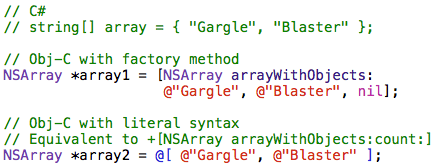
The code for creating an NSArray with a pre-defined list of objects is now much less verbose. Refer to Figure 1 to see a comparison of creating an array in C#, old-school Objective-C, and using container literals in Objective-C.

Figure 1 – Creating an immutable array

Initialize an NSArray by including a comma-separated list of objects between @[ and ]. The compiler converts that line of code into a call to the +[NSArray arrayWithObjects:count:] class method. Note, similar to the C# array initialization code, an array created with container literal syntax does not include a nil argument list terminator.

It is not currently possible to create a mutable collection via literal syntax.

Dictionaries

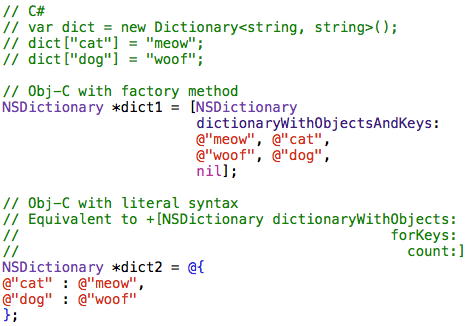
The container literal syntax for creating an NSDictionary is similar to what was seen above. Instead of using brackets, a dictionary is initialized between braces. As seen in Figure 2, the syntax is @{ key : value, key : value }

Figure 2 – Creating an immutable dictionary

My favorite part about this new language feature is that dictionaries can now be used with the standard key/value notation, instead of the bizarre value/key pattern that has plagued NSDictionary for years.

Boxed Numbers

Copying primitive values, such as ints, into an object has always been tedious. This task is generally referred to as boxing. It is usually done because Foundation collections (such as NSArray and NSDictionary) can only store objects, not primitive values. Boxing in C# is taken care of by the compiler, which has pros and cons. In Objective-C the developer must instantiate an NSValue or NSNumber and put a primitive value into it (i.e. “box” it).

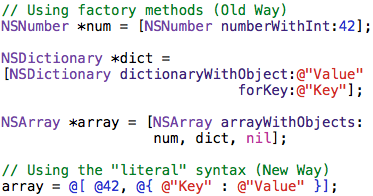
The new literal syntax does not remove the need to box values, but it makes the code much more streamlined and readable. As seen in Figure 3, simply put an @ before the literal/constant value, such as @42, and the compiler implicitly wraps that number in the appropriate box type.

Figure 3 – Boxing a number added to an array

Subscripting

Unfortunately, the full feature set of this language enhancement is unavailable for iOS developers, probably until iOS 6 ships. Figure 4 shows that subscripting, which uses array-like syntax to provide easy access to collections, is not yet supported by the compiler.

Figure 4 – Subscripting does not work yet

There is a workaround for this limitation, described in Peter Steinberger’s blog post titled Using subscripting with Xcode 4.4 and iOS 4.3+. The general idea is to include a category on NSObject that declares subscripting methods usable by, but currently unavailable for, iOS apps.

Further reading

For a full explanation of this set of related compiler enhancements, check out the Clang documentation page titled Objective-C Literals. The Big Nerd Ranch published a great blog post about the implications of using Objective-C literals, in the Objective-C Literals, part 2 post.

If you are a .NET developer learning how to write iPhone or iPad apps, check out my book iOS Programming for .NET Developers.

Posted in iOS Programming for .NET Developers, Objective-C, Xcode 4 | 1 Comment

My book about iOS programming is now available in iBooks

Well, that was fast! Less than forty-eight hours after I submitted iOS Programming for .NET Developers to Apple’s iBookstore, it got approved and is now available for sale worldwide. I heard of some books taking weeks or even months to get approved, so I must have some special mojo working in my favor…

If you’re a .NET developer looking to learn iOS, and want to read about it on your iPad or iPhone, visit http://itunes.apple.com/book/isbn9780985784508

Visit the book’s homepage to learn more about it, and the various formats it is available in.

Posted in Uncategorized | 2 Comments

My book about iOS programming is now available!

Over the past several months I have been working like a madman on a book that explains iOS to .NET developers. I’m proud to announce that iOS Programming for .NET Developers has been published! Like my last book, this book is self-published. It is currently available in paperback and Kindle editions, but stay tuned for iBooks and Nook editions coming soon.

For more information, and a free sample, visit http://iosfordotnetdevs.com

Posted in Books, iOS Programming for .NET Developers | 15 Comments